Telegram Casino UX: Design and Technical Considerations
A casino experience opened from Telegram is part of a larger conversation: people may enter from a bot's menu, a message button or a direct Mini App link, move into a web view, leave to answer a chat and return later from another device. These transitions are UX and system-design problems, not just styling decisions. Telegram documents several Mini App launch methods, dynamic themes, viewport changes, navigation controls and signed initialization data; each carries implementation constraints. Meanwhile, a casino operator must preserve authoritative account, balance and transaction states outside the chat interface. This guide shows how to design the complete journey, from first launch and game discovery to safe returns, accessibility, error recovery and technical acceptance tests, without assuming that a Telegram profile alone establishes casino eligibility. [1] [3] [7]
Published
Good Telegram casino UX connects the chat entry point to a secure, responsive and recoverable product journey.
On this page
What makes Telegram casino UX different from a mobile website?
A Mini App runs inside a Telegram client context. Users arrive with chat expectations, a potentially constrained web view, a Telegram-controlled header and platform-native navigation. The same product may also be opened in a browser outside Telegram. Design for both contexts and detect supported capabilities instead of treating a single device screenshot as the specification. [1] [3]
A good experience separates the messaging layer from casino operations. Telegram can supply a launch route and signed context, but the operator's backend must decide account access, eligibility, balance, game availability and transaction outcomes. Returning to a conversation must never silently alter a pending financial action. [1] [7]
Which launch surfaces and user paths need separate designs?
Telegram supports several ways to launch a Mini App, including bot profile or menu entry, buttons and direct links. Available methods and data returned to the application depend on the entry method. Record each supported route, associated parameters and expected return behavior before drawing the screens. [1] [3] [4] [5]
Entry or state
User expectation
Design and technical check
Bot welcome
Know what the service does
Clear start and help choices
Bot menu
Open a consistent main view
Configured Mini App and navigation
Message button
Complete a specific task
Context and return state
Direct app link
Open a shared destination
Validate start parameter
Resume from chat
Continue without confusion
Refresh identity and server state
Desktop or browser
Find working controls
Responsive layout and fallback
Do not assume that every entry can use the same data-transfer method. For example, Telegram documents `sendData` for the keyboard-button launch case and other interactions through Bot API mechanisms. The implementation should follow the specific entry contract. [1] [4]
What should first-run onboarding make clear?
An onboarding flow should explain the product before requesting sensitive actions. Start with a concise description of what opens in Telegram, whether an existing casino account is required and which identity or eligibility checks may follow. Separate the Telegram profile from the operator's account; never imply automatic verification solely because the Mini App opened. [1] [2]
Make the first action obvious: browse available content, sign in or request help as appropriate.
Explain any required account linking, consent or eligibility steps before collecting personal details.
Show the jurisdiction-appropriate restrictions, limits and support access in the user's language.
Offer a recoverable path for rejected, interrupted or already-linked accounts without revealing private information.
Use readable labels, familiar buttons and clear consequences for every action. Telegram's own bot guidelines favor useful welcome messages and predictable keyboard behavior; accessibility guidance also applies to the mobile view. [2] [6]
How should navigation respond to the Mini App viewport and controls?
Telegram exposes theme parameters, safe-area insets, viewport dimensions, and Mini App navigation controls. Build a mobile-first shell that reacts to actual visible space and respects content safe areas, especially around a header, bottom action area or full-screen transition. Avoid putting essential buttons where system gestures or client controls may cover them. [1]
Define top-level views such as lobby, game, wallet, account and help with clear active states.
Keep high-value actions visible but outside safe-area and keyboard overlap; test viewport changes.
Connect in-app Back behavior to Telegram's supported BackButton where appropriate and preserve user context.
Handle loading, cancellation and exit confirmation without trapping users inside a game or modal.
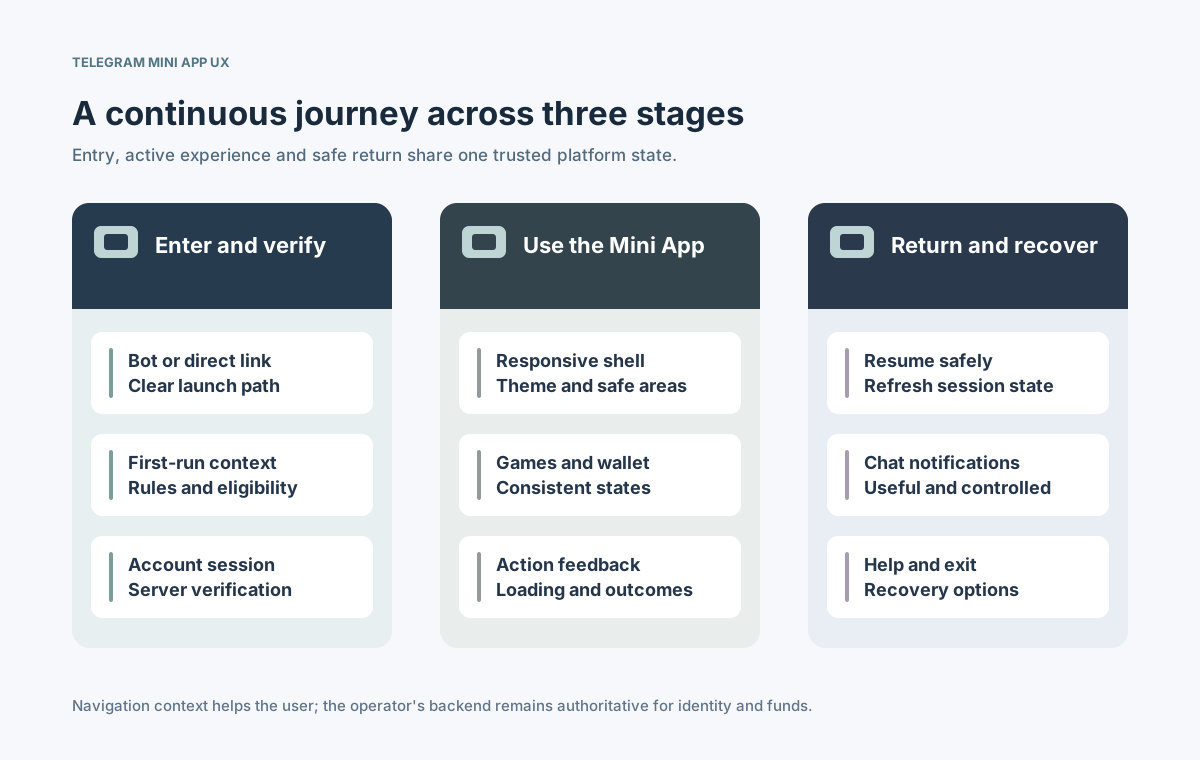
⊕View largerEntry, active use and return require separate states tied to the same backend account.
Choose layout behavior from measured viewport changes and tested clients. Telegram distinguishes stable viewport dimensions for bottom-anchored content and publishes events for theme and viewport changes; verify the supported version instead of assuming every device has the latest controls. [1] [6]
How should game and wallet journeys stay consistent across channels?
A game list, embedded game, cashier and transaction history often involve different services. Their UI must reflect authoritative backend responses and distinguish a requested action from a confirmed result. A Telegram screen should never invent a new wallet balance or declare a pending payment complete because a local animation finished. [7]
Journey step
Visible UX requirement
Backend or integration check
Find a game
Availability and clear filters
Market and provider eligibility
Start a session
Progress and retry guidance
Authorized game launch token
View balance
Currency and last known status
Server-derived wallet state
Payment or withdrawal
Pending, completed, failed states
Confirmed transaction outcome
Switch channel
Return to the right context
One account and reconciliation
Keep the same business meanings across Telegram and the main casino site while allowing different screen layouts. If a game or payment flow cannot safely resume in the web view, say so and provide an explicit status or alternative path rather than hiding the interruption. [1] [7]
How should Telegram identity and casino sessions be secured?
Telegram warns that `initDataUnsafe` is not trusted for server decisions. Send the raw `initData` to a backend that verifies its integrity with the documented validation method and checks freshness. Only then may it contribute to linking a Telegram user to the operator's account. The signed launch context is not a replacement for the operator's authentication, age or jurisdiction checks. [1] [7]
Validate Telegram launch data and expiry on the server; never treat visible client fields as proof.
Bind to the correct casino account with explicit access and conflict-handling rules.
Issue operator-controlled sessions with secure expiry, rotation and revocation procedures.
Reconfirm sensitive account or financial actions when the risk context requires it.
Plan for reused links, account switching, stolen sessions and logout on another device. OWASP advises server-side session expiration and reauthentication after high-risk events. Keep bot secrets and credentials out of the Mini App client bundle. [7]
Which performance and accessibility details matter in the web view?
A Mini App shares device resources with Telegram. Slow network startup, heavy game assets, keyboard resizing, low-memory devices and theme switches can all affect usability. Telegram's design guidance calls for responsiveness, familiar controls, accessible labels and respect for safe areas. W3C WCAG 2.2 offers broader criteria for keyboard access, target sizing, focus and visible errors. [1] [6]
Area
Common failure
Acceptance evidence
Initial load
Blank or long waiting screen
Measured progress and fallback
Touch navigation
Small or obscured controls
Tap-target and safe-area checks
Theme and contrast
Unreadable dark-mode content
Contrast and theme tests
Forms and errors
Focus lost behind keyboard
Keyboard, focus and recovery tests
Game frame
Frozen or oversized content
Device matrix and exit control
Test with representative Telegram versions and actual phones, not only responsive browser emulation. Optimize the lobby before loading large game assets; a visible loading state and graceful failure are part of the product contract, not cosmetic extras. [1] [2]
How can deep links and bot messages support a return visit?
Deep links can carry a start parameter that directs an eligible user toward a particular Mini App context. Treat that parameter as an untrusted navigation hint, not proof of permission. After opening, validate the session and destination on the server; missing or outdated content should fall back to a safe lobby or explanation. [1] [5]
Route a shared game or offer link through eligibility checks before revealing a destination.
Make notification preferences explicit and distinguish useful service updates from marketing.
Avoid exposing balances, identity details or transaction secrets in chat text or link parameters.
When a user returns after an outage or expired session, show the current server status and a clear next step.
Bots and Mini Apps use different interaction mechanisms. Configure bot commands, menu buttons and message links consistently, but test each independently. A notification should help the user understand an event and act safely rather than force an unexplained purchase or game launch. [2] [3] [4]
What operational and safety states need explicit UX?
Designers often polish the happy path while overlooking restrictions and failures. Real operations need understandable screens for unavailable games, account review, maintenance, disputed transactions, provider downtime, session expiry and support escalation. The actual restrictions depend on jurisdiction and operator policy and cannot be supplied by the Telegram UI alone. [1] [7]
Show age, territory and account-eligibility decisions without disclosing sensitive verification logic.
Keep account limits, safer-play controls and support access visible in appropriate flows.
Use precise pending/failed/completed wording for wallet and payment operations.
Provide status, retry guidance and incident help when game or provider services fail.
Let users leave or pause the experience without losing authoritative state or creating duplicate actions.
Record the owner of each error state, user message and recovery action. Avoid vague reassurance such as 'everything succeeded' when a transaction is still pending. Accessibility and session controls should remain available during degraded service. [6] [7]
What should teams test before releasing a Telegram casino experience?
Build an acceptance matrix covering entry methods, platform versions, user account states and back-office outcomes. Test changes to theme, viewport, network connectivity and application focus as well as normal gameplay. Every critical user action should have a visible result, server-side evidence and an understandable recovery route. [1] [4] [6]
Exercise bot menu, welcome button, inline entry and supported deep links with valid and invalid parameters.
Verify launch-data signatures, stale sessions, account switching and unauthorized destinations.
Test responsive layout, screen readers, keyboard focus, touch areas, dark mode and small screens.
Review eligibility, safer-play controls, support handoff, telemetry and rollback before sign-off.
A release-ready UX is not merely a polished home screen: it is a complete interaction contract among the chat, Mini App and licensed operator services. Maintain that contract when Telegram client capabilities, device characteristics or vendor APIs change. [1] [5] [7]